Basic Course 3: Life Savings

Non Custodial Airgapped Cold Wallet connected to a personal node

Overview

In this guide you learn to set up a high security Bitcoin storage system for generational wealth.

Want to go deeper on long-term storage and inheritance? Advanced CoursesPremium.

If you have questions feel free to contact us at: contact@btcguides.de

To support the website scan the QR code to send Sats via ⚡ lightning network: ruddywall05@walletofsatoshi.com

QR code for lightning donation

QR code for lightning donation

In the following table you will see that, when it comes to cold wallets, there is a wide range of choices available to the cultivated HODLER.
It is imperative to make a good choice here.

Maximum security should be chosen if avoiding loss is the most important criteria. If ease of use is also important, the less secure options could be considered for smaller percentages of ones wealth.

The best choice is qualified by reigning supreme in the comparison table.

Go deeper on seed security with Advanced: Seed StoragePremium.

A less secure cold wallet with great ease of use features could still be a good choice to replace a hot wallet for daily use.

Having different wallets is also great to introduce the concept of Decoy-Wallets to your security system.

If you just want to use the device without understanding the reason behind using it, you may skip to Stage 1.2

Let's get started!

Stage 1: Preparation

Stage 1.1: Choosing the right device

Take a look at the following table and compare the wallets. Look for the best option as well as one that you might want to use for its features.

First let us talk about the categories you might judge a device on:

Security Features:

Users will evaluate a hardware wallet or signing device on multiple securrity features. Not all of them are of equal importance. Here is a list of features that might be of interest to a user.

  • Secure Element (SE) Chip: Protects private keys in tamper-resistant hardware.
  • Open-Source Firmware: Allows public auditing for transparency and trust.
  • Firmware Signing & Secure Boot: Ensures only verified firmware runs on the device.
  • Air-Gapped Operation: Enables signing transactions without network or USB connection.
  • Passphrase Support (25th Word): Adds an extra layer of protection to the seed phrase.
  • On-Device Transaction Verification: Confirms amount and address on the wallet’s screen before signing.
  • Physical Tamper Resistance: Makes it hard to modify or inspect the device unnoticed.
  • Secure Backup & Recovery: Offline seed generation, Shamir backup options.
  • Multi-Signature Compatibility: Works in multisig setups to distribute trust.
  • Supply Chain Protection: Tamper-evident packaging and authenticity checks.

Supported Cryptocurrencies:

If you are a Bitcoin Maxi, ignore this. There is no other technology like Bitcoin. If you plan on using any "cryptos" or "shitcoins" as they are known among experienced Bitcoiners, make sure not to handle them on the same device as you handle your Bitcoin. This introduces complexity and with it more attack-vectors which might be avoided easily if assets were kept seperately. For identifying the best device in this table, a higher amount of points should be awarded to a device, if only Bitcoin is supported.

Ease of Use:

To properly evaluate this category, you should be very clear on what your purpose is. If you are looking to max out on security, then ease of use is not high up on the list. Think of it like a gigantic high security vault in a bank. You'd be laughed out of the house if you said: "Look, security is good and all, but what if we had a door without a lock right next to the big iron door, just so I can get in quicker." Of course the system should not invite mistakes by being extremely complicated to use, but things such as bluetooth options have no place when it comes to putting full focus on security matters. Less is better.
However if you are working on a wallet for a smaller amount of money which you'd like to use on the fly and do not care too much about if it were to be compromised, then go ahead and choose accordingly.

Compatibility:

In our table you can ignore this category, as all of the devices are compatible with the same operating systems. Namely Windows, Linux, and MacOS.

Price:

Considering you are buying to protect your wealth, price should not be a very highly weighted factor. However, the best option is one of the cheapest as well.

Backup and recovery:

In this category you will usually see a seedphrase private-key backup. Which means your private key displayed as a seedphrase is used to backup your private-key and thus your funds. Some devices offer a "backup file" which is just a file that in some form or another holds you private-key. At first you might think "that's great, less to worry about" but that's wrong as it also poses an added attack vector. This backup file is now the target of any attacker that wants your funds. Private-key storage is an important part of being a Bitcoiner. In the previous guide Basic Utility Level 1: Hot Wallets we made two copies of a paper backup and placed them in different places however in this level we will increase our defenses against the elements. This is one of the most important but also fun parts of being a Bitcoiner. You get to be creative in a setting that demands your utmost attention. This will be mentioned again at the end of this guide, so you do not need to do it now.

Community Trust and reputation:

This category is an interesting one. While reputation is a good pointer when it comes to finding a starting point, it ultimately doesn't hold any weight in the evaluation, if the system that is being sold is not air tight.

Ask yourself:

What good is an amazing reputation if there has been one or more data breaches identifying customers?

Is there a CEO who might be pressured to reveal information on the project?

Is there a secure element which upon loss of the device might compromise my private-key?

Am I buying the device from a single company, pre assembled unsure of what is actually in it?

If I'm buying a device like this, am I also identifying myself as a HODLER and also where I hold Bitcoin in?

If I'm buying a device like this, am I also identifying myself as a HODLER and also where I hold Bitcoin in?

Would I be able to source the parts from multiple shops and is the software FULLY FOSS (Free open source software) without any exeptions?

Reputation can be highly affected by marketing campaigns, negatively and positively. What a marketing campaign can not change is what the software and hardware components actually are and we need to look at reality to figure out the best possible path forward.

Additional Features:

More features, more complexity. Keep in mind that every component added to your device is a new component you optimally learn to understand to decide for yourself whether it poses a risk. This is time consuming. Remember that for maximum security bluetooth is generally not a good idea to have, but bluetooth, a touchscreen or ease of use features might come in handy for smaller amounts of money you are willing to expose to a little more risk in exchange for having a smoother experience.

Open Source:

This one is crucial. If a device runs software in which even just a small part is not FOSS, then rate it as a massive security risk and consider the device only for ease of use and small amounts you are willing to expose to more risk than necessary.

Customer Support:

This can be a good thing, depending on how it's implemented. If it involves giving up control of your private key or disclosing personal information like your name or address, then avoid the device. However, if it is a community-driven initiative where users and creators help each other identify and solve issues, then rate it positively.

Firmware Updates:

Firmware updates can be useful, provided they remain transparent and fully open-source (FOSS) in nature. As a general best practice, only update a device like this when you understand the purpose of the update and have determined that it is necessary or sensible. Any downloaded update should also include a way to verify the authenticity of both the manufacturer and the software.

Data Breaches:

Not every data breach means a loss of private-keys, but it does mean an information leak of some sort. This could be customer data, information on the code, which is especially interesting if there is a part of the code that isn't FOSS or information compromising the secure element. Fact is, if there has been a data breach, users have to rely on the company to tell them what happened and then trust nothing else happened. When it comes to security of large sums of money this should ring an alarm bell.

Here's a question to consider:

What is better than using the product of a company that has had no data breaches?

Simple answer:

Using a product where data breaches simply can not happen as there is no company that holds any information on you whatsoever.


Wallet Security Features Supported Cryptocurrencies Compatibility Price Backup & Recovery Community Trust & Reputation Additional Features FOSS Customer Support
Ledger Nano X Secure Element (CC EAL5+), PIN, passphrase 1,800+ coins & tokens Windows, macOS, Linux, iOS, Android ~$149 24-word seed phrase Large user base, mixed reputation after data breach Bluetooth, Ledger Live app No Email, help center
Trezor Model T Open-source firmware, PIN, passphrase, Shamir backup 1,600+ coins & tokens Windows, macOS, Linux, Android ~$219 12/24-word seed, Shamir backup Trusted brand, high reputation Touchscreen, Trezor Suite Yes Email, ticket system
Coldcard Mk4 Secure Element, air-gapped use via microSD, PIN, brick-me pins Bitcoin only Windows, macOS, Linux (wallet software) ~$157 BIP39 seed, optional dice rolls, encrypted backup Highly trusted in Bitcoin community Air-gapped signing, PSBT support Yes Email, documentation
BitBox02 Secure chip, open firmware, touch sensors, 2FA microSD backup Bitcoin-only edition or multi-coin edition (1,500+) Windows, macOS, Linux, Android ~$139 MicroSD backup, BIP39 seed Well regarded, strong reputation Compact design, BitBoxApp No Email, GitHub, docs
Keystone Pro Air-gapped QR code signing, fingerprint, secure element 5,000+ coins & tokens Windows, macOS, Linux, Android, iOS ~$169 MicroSD + seed phrase Good reputation, growing adoption Fingerprint sensor, open-source firmware No Email, Telegram, docs
SeedSigner Air-gapped (QR camera only), DIY build, multisig support Bitcoin only Works with Specter, Sparrow, BlueWallet ~$50 (DIY parts) SeedQR, manual input, no persistent storage Highly trusted among Bitcoin privacy/maxi community Completely stateless, QR signing Yes Community forums, GitHub

Stage 1.2: Aquiring the hardware

In this stage we will order the device parts. This guide assumes you've chosen the Seedsigner.

Here you will have to make a choice again. If you are aiming at best practice only, then you should buy all the parts of the Seedsigner using cash.
The second best option is buying at different online stores while using a VPN to hide your traces.
Another good option would be to have different people buy the parts for you.

If you buy parts online consider using our affiliate links which will help us keep the website running.

For an assembly without soldering, make sure to order a Raspberry Pi with presoldered hammer heads as the one in the link. If it is out of stock, simply order elsewhere.

Here's a shopping list:

Stage 2: Seedsigner assembly and installation

Stage 2.1: Seedsigner assembly

Stage 2.2: Downloading Seedsigner OS and signatures

Seedsigner OS (Operating System):

This is the operating system that will run on the Raspberry Pi. This will add all the programs necessary to create private-keys and sign transactions as well as other things, listed on the Seedsigner Github Page. If you'd like to take a deeper dive into what an OS is, here is a list of links with analogies to understand its function.

Analogy 1

Analogy 2

Stage 2.2.1: Download Seedsigner OS

Use the Github page, if it is down, use the second link.

Seedsigner Github Page

Seedsigner website

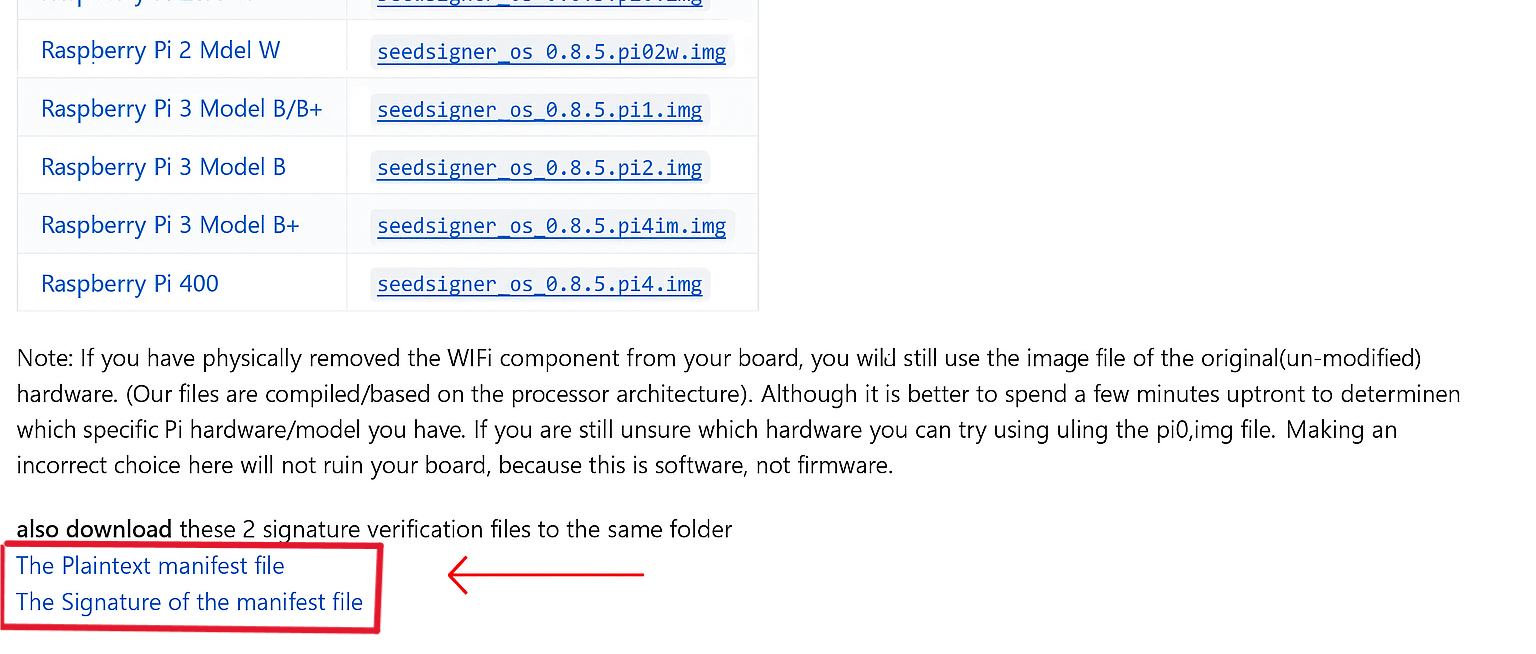
There are four different Seedsigner OS versions for different Raspberry Pi models. For the Raspberry Pi Zero W you can download either of the marked files, as both Pi models use the same file.

"seedsigner_os.0.8.6.pi0.img" - For Raspberry Pi Zero v1.3 & Raspberry Pi Zero W

Note: the W"H" in the Raspberry model you bought stands for the presoldered hammer head pins. Do not be discouraged by the file name being Zero W.

file-location-image

Stage 2.2.2: Downloading the manifest and signature files

While you are on that website, also download the files marked in red on the picture:

  • "seedsigner.0.7.0.sha256.txt.sig" by clicking on the "Plaintext Manifest file"
  • "seedsigner.0.7.0.sha256.txt" by clicking on "The signature of the manifest file"
  • file-location-image

    You will use these two files in the next step, when you verify the authenticity of the Seedsigner OS file you downloaded.

    Remember: Don't trust, verify.

    Stage 2.3: Verifying the integrity of Seedsigner OS

    Verify the software (Seedsigner OS) you downloaded is not malware.

    Click here to open the Apple/Mac guide

    On Mac

    You will need GPG Suite to verify the integrity of the files downloaded. For this you need to have GPG installed.

    To check wether GPG is installed:

    Step 1: On your mac open the program "terminal".

    To open "terminal" type "terminal" into your search bar.

    Step 2: Type

    gpg --version

    - If you see version information (e.g. gpg (GnuPG) 2.4.x), you already have it.
    - If you get command not found, continue with the installation steps below.

    If it is installed proceed at Step 4.

    If it isn't installed go to Step 3.

    Step 3:

    Go to GPG Suite

    Download the latest GPG Suite version, open the .dmg file and follow the installer.

    You will have command line tools and a graphical interface for managing keys.

    Step 4:

    In the terminal type:

    cd Downloads/

    to navigate into your downloads folder.

    Step 5:

    Type in:

    ls -l

    This will list all the files in your download folder. It is recommended, to not have too many files in there so it isn't cluttered.

    Step 6:

    Type in:

    curl https://keybase.io/seedsigner/pgp_keys.asc | gpg --import

    This will import the SeedSigner projects public key from the popular online keyserver called Keybase.io into your computers keychain.

    Step 7: Verify the file

    Type:

    gpg --verify seedsigner.0.7.*.sha256.txt.sig

    into your console. The terminal should now output the following:

    Good signature from

    You can ignore the warning message under it since we will now match the fingerprint/ID output against the proofs at Keybase.io/SeedSigner, and thereby confirm who the pubkey really belongs to.

    Step 8: Determine who the public key belongs to by going to Keybase.io/SeedSigner

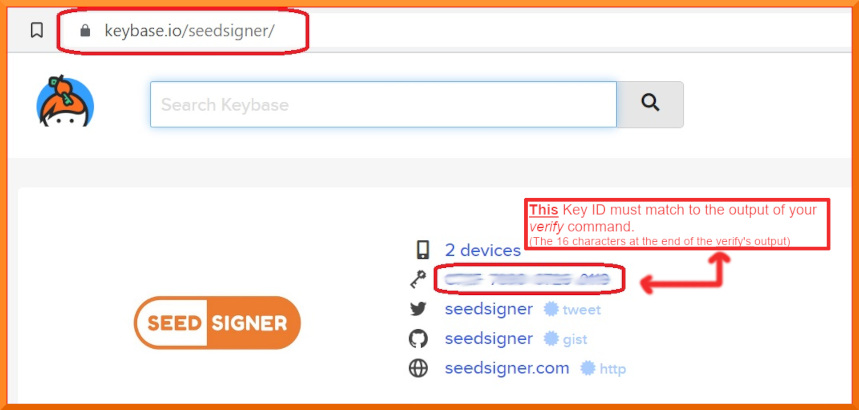
    For this you have to manually compare the "primary key fingerprint" output from your terminal to the key displayed on keybase.io/SeedSigner.
    The last 16 digits of your output must match exactly with the key.

    you find the key on keybase.io/SeedSigner next to the key symbol

    Once you have confirmed they match exactly you have now confirmed that the .sig file we downloaded is authentically from the SeedSigner project.

    Click here to open the Windows guide

    On Windows

    To verify the download on Windows you must have GPG installed. If it isn't installed already, follow the guide below to do so.

    GPG install

    To install GPG it is advised to again check the integrity of the software you downloaded.

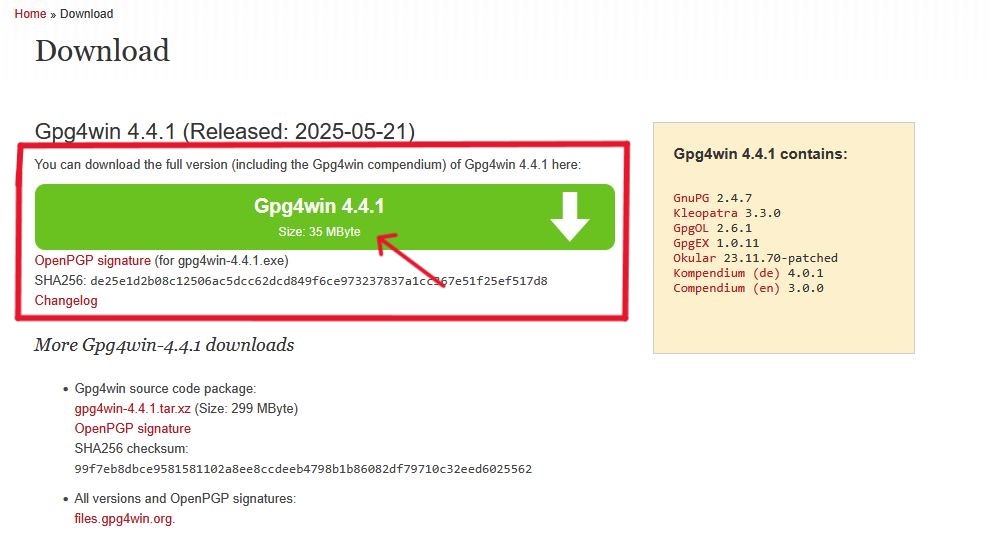
    Step 1: Go to gpg4win.org/download.html

    Download:

    GPG4win 4.3.1

    The version number may vary depending on updates. Make sure the signature file is for the same version as the GPG file itself. See the image if you aren't sure where to click.

    download location

    Step 2: Verify the given hash using SHA256

    To verify the SHA256 hash given below the download button you have multiple options. If you do not want to install any additional programs you can simply use windows powershell. This is the option we will use.

    Open windows powershell and type:

    Get-FileHash YOUR/FILE/PATH/HERE

    Make sure that the YOUR/FILE/PATH/HERE is actually the file path to your downloaded file. It will likely be your Downloads folder.

    It is important to have the space after the command and then input the path to your file. You can do this either by typing or dragging and dropping the file into the powershell window, which will automatically fill in the path file for you.
    Press enter and you will get a SHA256 hash.

    hash comparison

    Step 3: Now compare this hash to the one provided under the download button of GPG4win

    download location

    If they match exactly you know the file is provided by the owner of the site.

    Step 4: Install GPG4win

    Leave the check marks as they are.

    Step 5: Verify Seedsigner OS integrity on windows

    Now that you have installed GPG the verification process is simple.

    1. Open Powershell and type:

    cd downloads

    to navigate into your downloads folder. If you have placed the Seedsigner files in another folder, go there.

    2. Paste:

    gpg --fetch-keys https://keybase.io/seedsigner/pgp_keys.asc

    into powershell to get the Seedsigner Projects public key from the keybase.io key server.

    3. From inside the same folder run the command

    gpg --verify seedsigner.0.7.*.sha256.txt.sig

    This should result in you receiving the following output:

    The result MUST show "Good signature" for you to proceed safely. If this is not the case, stop here and try again or after confirming multiple times, get the Seedsigner OS from another source, the website might have been compromised.

    You can ignore the warning within the output as we will now verify whether the signature fits.

    Bonus information about the verify comamnd

    The verify command will attempt to decrypt the signature file (sha256.sig) by trying each public key already imported into your computer.

    If the public key we just imported (via fetch-keys), manages to:
    (a) successfully decrypt the .sig file , and
    (b), that result matches exactly to the clear-text equivalent (.sha256) of the .sig file, then its "a good signature"!

    Crucially, we must still manually check who exactly owns the Key ID which gave us that "Good signature". Thats what the warning message means- Who does the matching key really belong to?

    We will start by looking at keybase.io to see if it is "The SeedSigner project"'s public Key or not.

    Note that it is the file hashes of .sig and .sha256 that verify compares, not their raw contents.

    4. On the last output line, look at your rightmost 16 characters (the 4 blocks of 4). We must now check who that Primary key fingerprint /ID belongs to.

    The underlined Primary Key Fingerprint in the example output above is: C7EF 7090 0726 0119

    5. Now you have to manually compare the primary key fingerprint output from your terminal to the key displayed on keybase.io/SeedSigner. The last 16 digits of your output must match exactly with the key.

    Go to Keybase.io/SeedSigner

    you find the key on keybase.io/SeedSigner next to the key symbol

    Once you have confirmed they match exactly you have now confirmed that the .sig file we downloaded is authentically from the SeedSigner project.

    Stage 2.4: Formatting SD card for Seedsigner

    Materials Needed:

    1. Download Balena Etcher for Windows or Mac directly from etcher.balena.io/

    2. Install from whereever you saved it to.

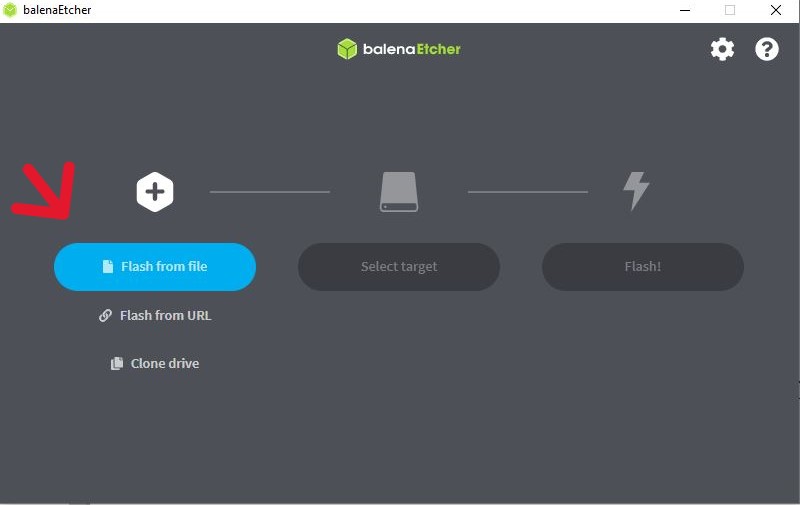
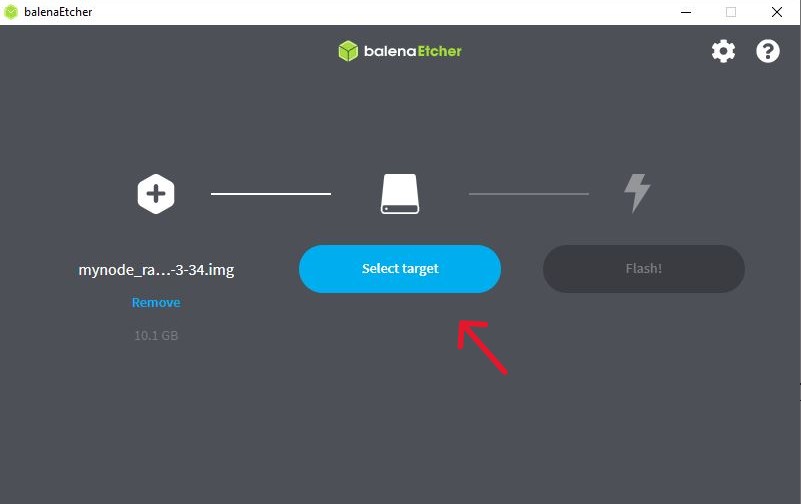
    3. Open Balena Etcher, click "flash from file" and choose the seedsigner-OS image file.

    click here to see content as text

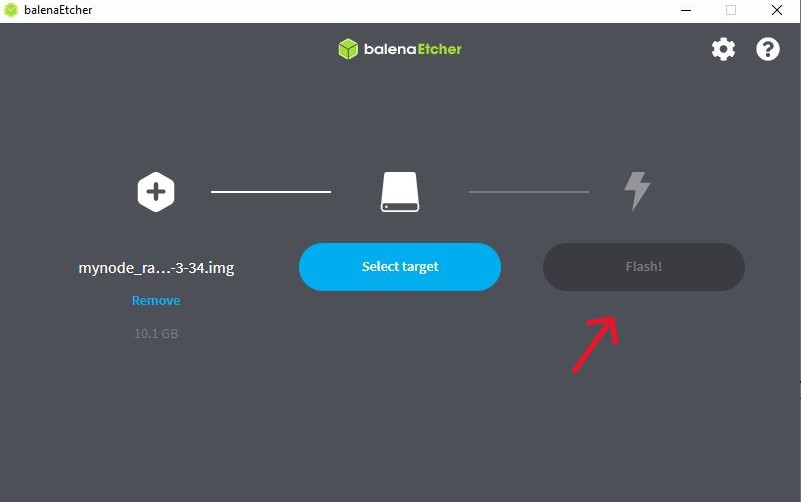
    4. Select the target SD card and make sure it is the correct one! This process will delete all data previously on the SD card.

    click here to see content as text

    5. Click on the "flash" button.

    click here to see content as text

    The SD card is now ready.

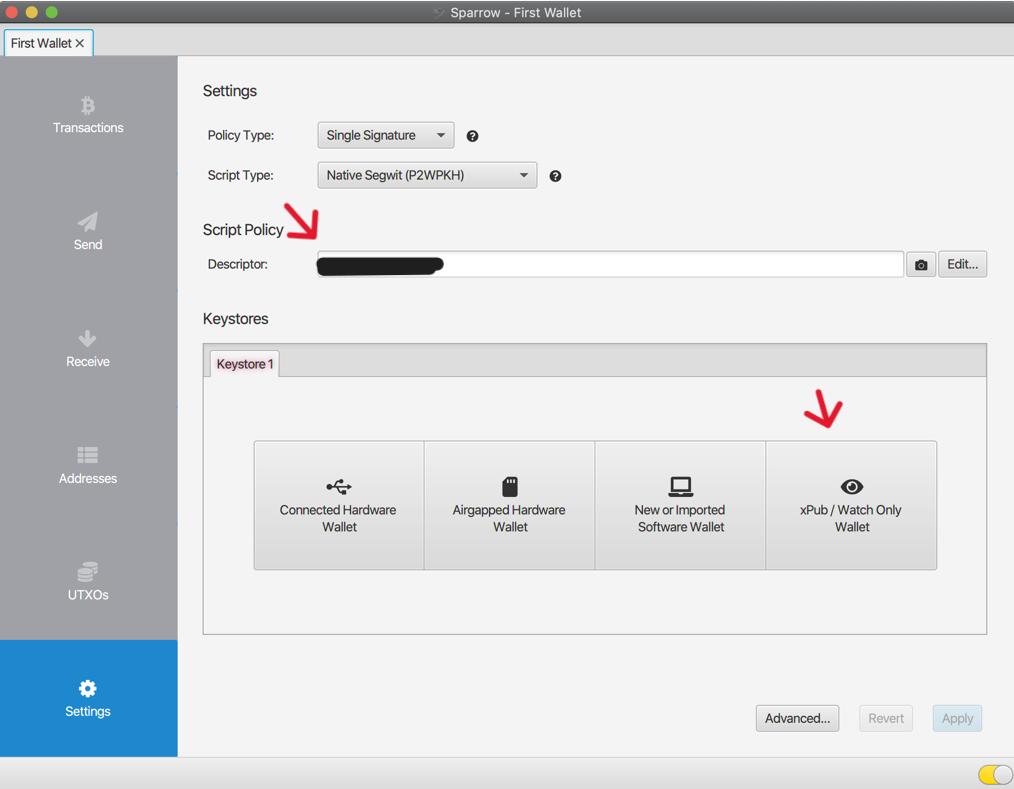
    Stage 3: Download, verify and install Sparrow Wallet

    A wallet software allows you to view the contents of your private-key. Understand a wallet like a control room outside the vault where you store your wealth. There are multiple possible setups and clearances this control room could have. Some are allowed to view the private-key, some aren't. We will talk about UTXO management in another post.

    Stage 3.1: Download and verification for Sparrow Wallet on Windows

    Click to open Windows Guide (Stage 3.1)

    Step 1.

    Download the Sparrow Wallet "Windows Installer (10+)" file from:

    sparrowwallet.com.

    Step 2.

    From the same page download the files "Manifest Signature" and "Manifest".

    Step 3.

    Open Power Shell and type

    cd downloads

    or whatever location you saved your files to.

    Step 4.

    Type

    ls

    to list all the files in said location.

    Step 5.

    Type:

    Get-FileHash

    (the space after the "Get-FileHash" command is important!)

    Either type the path to your file in or drag and drop your file into power shell. This will result in

    Get-FileHash pathname

    The file is called "Sparrow-2.1.3" or one with varying numbers at the end. Simply choose the one you downloaded.

    Press enter to run the command.

    Step 6.

    Now compare the hash output to the hash in the "Manifest" text document. For this you will have to look at the hash corresponding to the exact Sparrow Wallet file you downloaded. In this tutorial it is "Sparrow-2.1.3" and is an .exe file.

    Step 7.

    Either manually compare the hashes by eye or do so through a utility program such as MD5 & SHA Checksum Utility 2.1.

    Step 8.

    Next you will compare the public key of the creator to the files you downloaded. For this type

    gpg --fetch-keys https://keybase.io/craigraw/pgp_keys.asc

    in Power Shell.

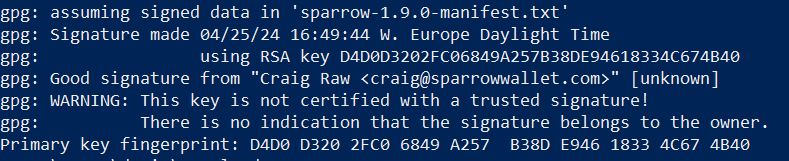
    The result should look like this:

    click here to see content as text
    PS C:\Users\"yourusername"\Downloads> gpg --fetch-keys https://keybase.io/craigraw/pgp_keys.asc
            gpg: requesting key from 'https://keybase.io/craigraw/pgp_keys.asc'
            gpg: key E94618334C674B40: public key "Craig Raw " imported
            gpg: Total number processed: 1
            gpg:               imported: 1

    Step 9.

    Now type

    gpg --verify sparrow-2.1.3-manifest.txt.asc

    The result should look like this (version number varies depending on update what is now 2.1.3 used to be 1.9.0):

    click here to see content as text
    PS C:\Users\danie\Downloads> gpg --verify sparrow-1.9.0-manifest.txt.asc
            gpg: assuming signed data in 'sparrow-1.9.0-manifest.txt'
            gpg: Signature made 04/25/24 16:49:44 W. Europe Daylight Time
            gpg:                using RSA key D4D0D3202FC06849A257B38DE94618334C674B40
            gpg: Good signature from "Craig Raw " [unknown]
            gpg: WARNING: This key is not certified with a trusted signature!
            gpg:          There is no indication that the signature belongs to the owner.
            Primary key fingerprint: D4D0 D320 2FC0 6849 A257  B38D E946 1833 4C67 4B40

    The result must display "Good signature". Ignore any email addresses - only matching Key fingerprints count here. Stop immediately if it displays "Bad signature"!

    Step 10.

    On the last output line, look at your rightmost 16 characters (the 4 blocks of 4). Crucially, we must now check WHO that Primary key fingerprint/ID belongs to. We will start by looking at Keybase.io to see if it is the SeedSigner project 's public key or not.

    More info on the warning:

    Since you are about to match the outputted fingerprint/ID against the proofs at Keybase.io/SeedSigner, and thereby confirm who the pubkey really belongs to-, you can safely ignore this warning message:

             WARNING: This key is not certified with a trusted signature!
             There is no indication that the signature belongs to the owner.
            
    Skippable info on the "verify" command:

    The verify command will attempt to decrypt the signature file (sha256.sig) by trying each public key already imported into your computer. If the public key we just imported (via fetch-keys), manages to: (a) successfully decrypt the .sig file , and (b), that result matches exactly to the clear-text equivalent (.sha256) of the .sig file, then its "a good signature"!

    Crucially, we must still manually check who exactly owns the Key ID which gave us that "Good signature". Thats what the warning message means- Who does the matching key really belong to? We will start by looking at keybase.io to see if it is "The SeedSigner project"'s public Key or not. Note that it is the file hashes of .sig and .sha256 that verify compares, not their raw contents.

    Step 11.

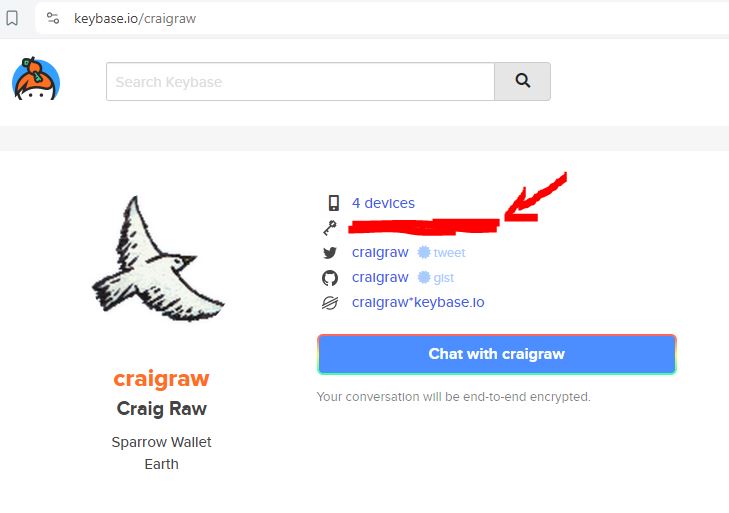
    Determine who the public key belongs to by going to Keybase.io/craigraw

    For this you have to manually compare the "primary key fingerprint" output from your terminal to the key displayed on keybase.io/SeedSigner. The last 16 digits of your output must match exactly with the key.

    you find the key on keybase.io/craigraw next to the key symbol

    Once you have confirmed they match exactly you have now confirmed that the .sig file we downloaded is authentically from the craigraw/thesparrowwallet team.

    Step 12.

    Open the file location where you saved Sparrow Wallet to and run the .exe as administrator by left clicking and choosing "run as administrator" to install.

    Stage 3.2: Download and verification for Sparrow Wallet on Mac

    Click to open Mac Guide (Stage 3.2)

    Step 1.

    Depending on your Mac, Download the Sparrow Wallet "macOS (Intel) (11+)" or the "macOS (Apple M-series)" file from:

    sparrowwallet.com.

    Step 2.

    From the same page download the files "Manifest Signature" and "Manifest".

    Step 3.

    In the Mac search type "terminal" and open it.

    In the terminal type:

    cd ~cd /Downloads

    This navigates you to the Downloads folder, where the files you downloaded should be, unless you chose a different location.

    Step 4.

    Type:

    ls

    This will list all files in the directory you are in.

    Step 5.

    Type:

    shasum -a 256 /path/to/your/file

    You can either type your file path or drag and drop the file into terminal, which will write out the file path for you.

    Step 6.

    Now compare the hash output to the hash in the "sparrow-2.2.3-manifest.txt" text document by opening it.

    Look at the hash corresponding to the exact Sparrow Wallet file you downloaded. In this tutorial it is "Sparrow-2.2.3" and is an .exe file.

    Step 7.

    Either manually compare the hashes by eye or do so through a utility program such as MD5 & SHA Checksum Utility 2.1.

    Step 8.

    Next you will compare the public key of the creator to the files you downloaded. For this type "curl -0 https://keybase.io/craigraw/pgp_keys.asc gpg --import pgp_keys.asc" in the terminal.

    THe result should look like this:

    Step 9.

    Now type:

    gpg --verify sparrow-2.1.3-manifest.txt.asc

    The result should look like this (version number varies depending on update what is now 2.2.3 used to be 1.9.0):

    click here to see content as text
    PS C:\Users\danie\Downloads> gpg --verify sparrow-1.9.0-manifest.txt.asc
            gpg: assuming signed data in 'sparrow-1.9.0-manifest.txt'
            gpg: Signature made 04/25/24 16:49:44 W. Europe Daylight Time
            gpg:                using RSA key D4D0D3202FC06849A257B38DE94618334C674B40
            gpg: Good signature from "Craig Raw " [unknown]
            gpg: WARNING: This key is not certified with a trusted signature!
            gpg:          There is no indication that the signature belongs to the owner.
            Primary key fingerprint: D4D0 D320 2FC0 6849 A257  B38D E946 1833 4C67 4B40

    The result must display "Good signature". Ignore any email addresses - only matching Key fingerprints count here. Stop immediately if it displays "Bad signature"!

    Step 10.

    On the last output line, look at your rightmost 16 characters (the 4 blocks of 4). Crucially, we must now check WHO that Primary key fingerprint/ID belongs to. We will start by looking at Keybase.io to see if it is the SeedSigner project 's public key or not.

    More info on the warning:

    Since you are about to match the outputted fingerprint/ID against the proofs at Keybase.io/SeedSigner, and thereby confirm who the pubkey really belongs to-, you can safely ignore this warning message:

             WARNING: This key is not certified with a trusted signature!
             There is no indication that the signature belongs to the owner.
            
    Skippable info on the "verify" command:

    The verify command will attempt to decrypt the signature file (sha256.sig) by trying each public key already imported into your computer. If the public key we just imported (via fetch-keys), manages to: (a) successfully decrypt the .sig file , and (b), that result matches exactly to the clear-text equivalent (.sha256) of the .sig file, then its "a good signature"!

    Crucially, we must still manually check who exactly owns the Key ID which gave us that "Good signature". Thats what the warning message means- Who does the matching key really belong to? We will start by looking at keybase.io to see if it is "The SeedSigner project"'s public Key or not. Note that it is the file hashes of .sig and .sha256 that verify compares, not their raw contents.

    Step 11.

    Determine who the public key belongs to by going to Keybase.io/craigraw

    For this you have to manually compare the "primary key fingerprint" output from your terminal to the key displayed on keybase.io/SeedSigner. The last 16 digits of your output must match exactly with the key.

    you find the key on keybase.io/craigraw next to the key symbol

    Once you have confirmed they match exactly you have now confirmed that the .sig file we downloaded is authentically from the craigraw/thesparrowwallet team.

    Step 12.

    Open the file location where you saved Sparrow Wallet to and double click the .dmg file to install Sparrow Wallet.

    Stage 4: Private Key and watch only wallet creation

    Stage 4.1: Create a private-key

    Make your own secret private-key in the form of a QR code and a seedphrase

    To create a private-key we need entropy or to put it simply: randomness.

    The Seedsigner gives you a few options here. You could have the device take a picture and use the randomness in it to create a private key, or you could use dice or a coin to create your very own entropy taken directly from the universe.

    Picture Method

    Pros

    • Fast and user-friendly
    • Uses camera sensor noise and pixel variation
    • No need for manual input

    Cons

    • Entropy source is abstract
    • Requires trust in randomness implementation

    Dice/Coin Method

    Pros

    • Fully auditable entropy source
    • Transparent and reassuring for paranoid users
    • Immune to software bugs in randomness generation

    Cons

    • Slower and more error-prone (manual entry)
    • Requires knowledge of bit conversion

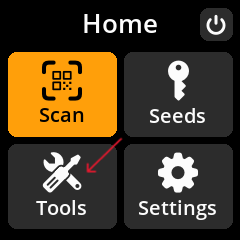
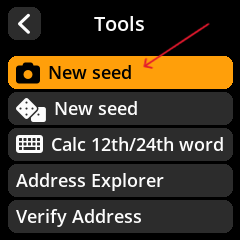
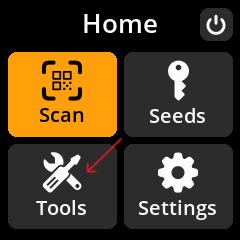
    For the picture key creation you start up the Seedsigner by plugging it into a powerbank. Then navigate to "🔧 Tools" and choose "📷 New seed". Proceed from there and make sure to note the Seedphrase and fingerprint down diligently. If you want to add a 25th word as a password, you can.

    image of seedsigner main menu view image of seedsigner tools menu view

    You might choose to skip ahead to Stage 4.2: Backing up the private key as a seedphrase or QR code

    We recommend creating your own entropy in keeping with the Bitcoin principle of reducing trust in third parties.

    Stage 4.1.1: Creating your own entropy using a coin or dice

    This will take some time. You will flip a coin, or roll dice 256 times.

    Step 1:

    Make sure there are no cameras or microphones around.

    Step 2:

    Get:

    • paper
    • pen
    • dice or coin

    As for the paper you can also download and print this PDF template we prepared and write your digits in the binary rows.

    Step 3:

    Learn the rules

    1. For the coin: consider heads an output of 0 and tails an output of 1. You could also do it the other way around but you have to decide which way and stick to it.

    2. For the dice: consider the numbers 1,2,3 to have an output of 0 and 4,5,6 an output of 1.

    3. Decide whether you write and read from right to left or vice versa.

    4. You must maintain consistency with the ruleset you decided beforehand.

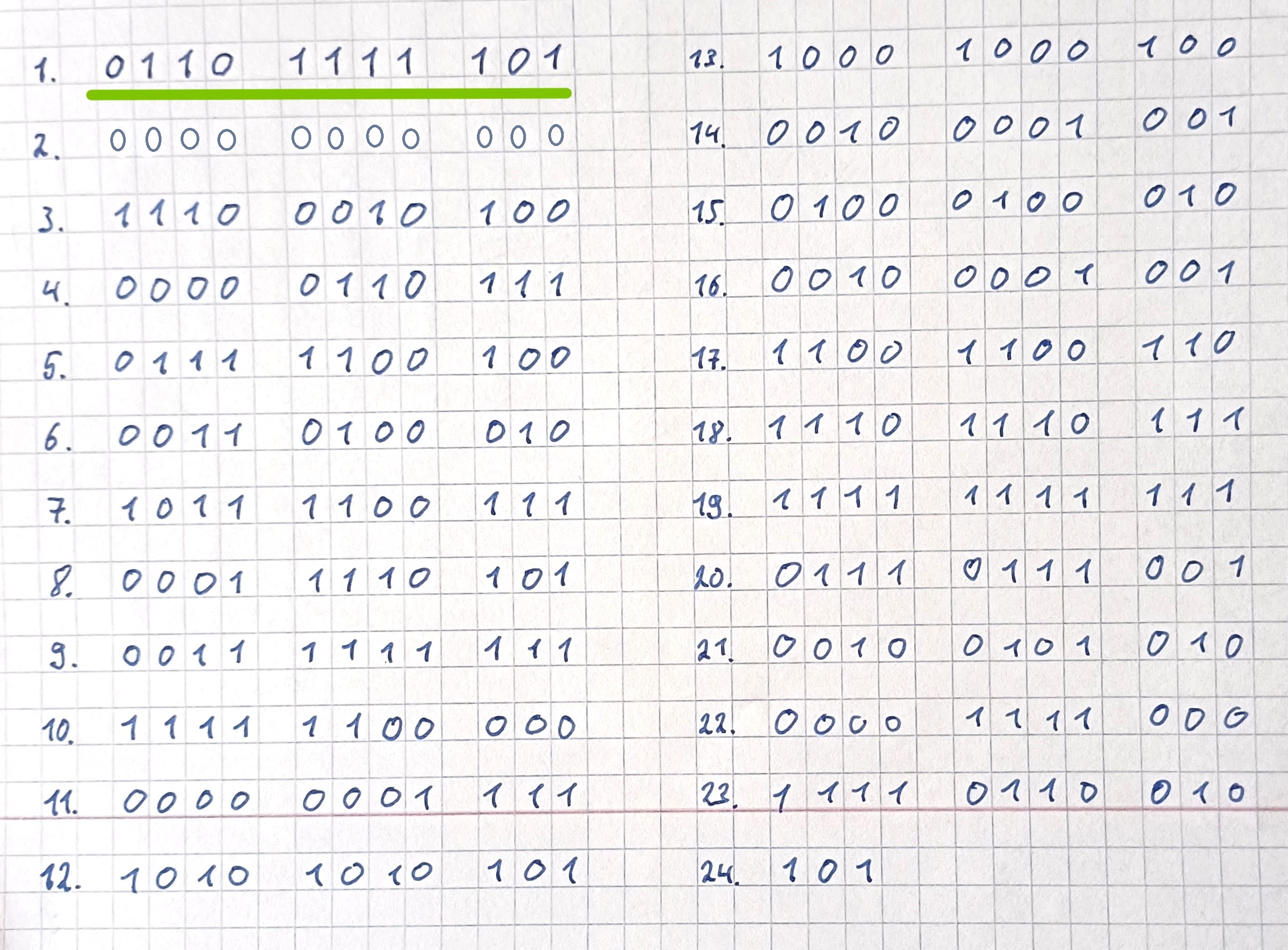
    5. You must make 23 lines of 11 digits. The 24th line will only need 3 digits.

    6. For each line, clump digits into groups of 4-4-3 (see image below) for easy reading and calculating. Keep your vertical columns aligned as much as possible and leave space between each row for manual calculations.

    Step 4: Start the process

    1. Flip the coin or roll the dice

    2. Write down the result in your first row

    3. Keep flipping and writing to finish your first row in groups of 4, 4 and 3 digits.

    4. Make 23 rows and then write down another three digits for row 24.

    23 rows of 11 numbers in groups of 4, 4 and 3

    There are 256 binary digits here — 23 complete sets of 11 binary digits with the 24th row only needing three binary digits.

    This will make sense later. For now, understand that every 11 binary digits will be translated to a mnemonic seed word and eventually result in a mnemonic seedphrase.

    A note on randomness:

    As explained in the article DIY Bitcoin Private Key Project by Arman The Parman from Bitcoin Magazine, a private key generated with all-zero entropy once matched an existing wallet, showing how dangerous bad randomness can be.

    "You can make these 256 bits of random data any way you want, as long as it’s actually random. If it’s not random, someone might be able to reproduce the data. They would then be able to recreate your private key and could take all of your bitcoin. For example, if you make 256 bits of all zeroes (clearly not random), then someone will be able to guess your private key. Here’s proof: I generated a private key from that terrible all-zeroes randomness and found someone’s existing wallet. If it hadn’t already been emptied, I could have stolen the funds.

    Here's proof: I generated a private key from that terrible all-zeroes randomness and found someone's existing wallet. If it hadn't already been emptied, I could have stolen the funds.

    image of wallet found using terrible private key with all zeroes for entropy

    They clearly knew what they were doing because it was a small amount and they didn’t leave any coins there for long. It might have been a demonstration, who knows. But other people have made non-random private keys that were guessable and as a result lost their bitcoin. But don’t worry, if you make a truly random private key, someone would have to exactly repeat your binary dice rolls or coin flips and, thanks to exponential math, that’s not going to happen during the life of the universe."

    Quote from Bitcoin Magazine, published April 2021: "DIY Bitcoin Private Key Project"

    Stage 4.1.2: Converting our binary digit entropy to decimal

    In binary, there are only two digits: 1s and 0s. Each 1 or 0 is called a bit, which is one piece of information. This is the smallest unit of information in computing.

    In binary, a set of eleven bits could look like the first one from our example above:

    0110 1111 101

    and can be converted to a decimal number by multiplying each bit with powers of two descending from 2¹⁰, 2⁹,...,2⁰ and then adding the result up.

    (2¹⁰ x 0) + (2⁹ x 1) + (2⁸ x 1) + (2⁷ x 0) + (2⁶ x 1) + (2⁵ x 1) + (2⁴ x 1) + ( x 1) + ( x 1) + ( x 0)+ (2⁰ x 1) = 1833

    Decimals are easier to handle than powers of two.

    So we will use decimals from here.

    The table below shows which decimal can represent which power of two.

    2¹⁰ 2⁹ 2⁸ 2⁷ 2⁶ 2⁵ 2⁴ 2⁰
    1024 512 256 128 64 32 16 8 4 2 1

    We can now take our group of eleven binary digits and multiply them by the decimals from our table above.

    0 1 1 0 1 1 1 1 1 0 1
    1024 512 256 128 64 32 16 8 4 2 1

    1024 x 0 + 512 x 1 + 256 x 1 + 128 x 0 + 64 x 1 + 32 x 1 + 16 x 1 + 8 x 1 + 4 x 1 + 2 x 0 + 1 x 1 = 893

    Do this calculation for all of your 23 rows, do so carefully and then double check for errors by recalculating a second time. You can either do this on a sheet of paper you design or download the two PDF files we made. PDF 1 and PDF 2. Below you see part of the table in the PDF and each field explained.

    Stage 4.1.3: Matching the decimals to the Bitcoin Wordlist (BIP39)

    Warning: Do not use a phone or even have a phone in the room. You can use this PDF cheatsheet to make adding up the decimals faster.

    A group of eleven bits (from the highest place value 2¹⁰ down to 2⁰) can represent decimal numbers from 0 up to 2047. Because of this there is the +1 cell in the table, before we get our word, as the wordlist starts from 1-2048 not from 0-2047 and therefore does not have a word corresponding to the result 0.

    It is recommended to view this on desktop for more visual clarity.

    • powers of two as decimal
    • rows with your groups of 11 digits in binary
    • Direction of calculation
    • adding +1 to the added up decimal to match the wordlist below
    • the result after adding up the decimals and then adding +1 to match the wordlist
    # x1024 x512 x256 x128 x64 x32 x16 x8 x4 x2 x1 +1 Result Word
    1. Binary 0 1 1 0 1 1 1 1 1 0 1
    Decimal 0 + 512 + 256 + 0 + 64 + 32 + 16 + 8 + 4 + 0 + 1 893 + 1 894 hurry
    2. Binary 0 0 0 0 0 0 0 0 0 0 0
    Decimal 0 + 0 + 0 + 0 + 0 + 0 + 0 + 0 + 0 + 0 + 0 0 + 1 1 ability
    3. Binary 1 1 1 0 0 0 1 0 1 0 0
    Decimal 1024 + 512 + 256 + 0 + 0 + 0 + 16 + 0 + 4 + 0 + 0 1812 + 1 1813 tip
    Binary Decimal
    0 x 1024
    1 x 512
    1 x 256
    0 x 128
    1 x 64
    1 x 32
    1 x 16
    1 x 8
    1 x 4
    0 x 2
    1 x 1
    = 893
    +1 894
    Word hurry

    You can always find the word list here on Github and multiple other pages simply by searching the Bitcoin Wordlist.

    Wordlist
    1. abandon
    2. ability
    3. able
    4. about
    5. above
    6. absent
    7. absorb
    8. abstract
    9. absurd
    10. abuse
    11. access
    12. accident
    13. account
    14. accuse
    15. achieve
    16. acid
    17. acoustic
    18. acquire
    19. across
    20. act
    21. action
    22. actor
    23. actress
    24. actual
    25. adapt
    26. add
    27. addict
    28. address
    29. adjust
    30. admit
    31. adult
    32. advance
    33. advice
    34. aerobic
    35. affair
    36. afford
    37. afraid
    38. again
    39. age
    40. agent
    41. agree
    42. ahead
    43. aim
    44. air
    45. airport
    46. aisle
    47. alarm
    48. album
    49. alcohol
    50. alert
    51. alien
    52. all
    53. alley
    54. allow
    55. almost
    56. alone
    57. alpha
    58. already
    59. also
    60. alter
    61. always
    62. amateur
    63. amazing
    64. among
    65. amount
    66. amused
    67. analyst
    68. anchor
    69. ancient
    70. anger
    71. angle
    72. angry
    73. animal
    74. ankle
    75. announce
    76. annual
    77. another
    78. answer
    79. antenna
    80. antique
    81. anxiety
    82. any
    83. apart
    84. apology
    85. appear
    86. apple
    87. approve
    88. april
    89. arch
    90. arctic
    91. area
    92. arena
    93. argue
    94. arm
    95. armed
    96. armor
    97. army
    98. around
    99. arrange
    100. arrest
    101. arrive
    102. arrow
    103. art
    104. artefact
    105. artist
    106. artwork
    107. ask
    108. aspect
    109. assault
    110. asset
    111. assist
    112. assume
    113. asthma
    114. athlete
    115. atom
    116. attack
    117. attend
    118. attitude
    119. attract
    120. auction
    121. audit
    122. august
    123. aunt
    124. author
    125. auto
    126. autumn
    127. average
    128. avocado
    129. avoid
    130. awake
    131. aware
    132. away
    133. awesome
    134. awful
    135. awkward
    136. axis
    137. baby
    138. bachelor
    139. bacon
    140. badge
    141. bag
    142. balance
    143. balcony
    144. ball
    145. bamboo
    146. banana
    147. banner
    148. bar
    149. barely
    150. bargain
    151. barrel
    152. base
    153. basic
    154. basket
    155. battle
    156. beach
    157. bean
    158. beauty
    159. because
    160. become
    161. beef
    162. before
    163. begin
    164. behave
    165. behind
    166. believe
    167. below
    168. belt
    169. bench
    170. benefit
    171. best
    172. betray
    173. better
    174. between
    175. beyond
    176. bicycle
    177. bid
    178. bike
    179. bind
    180. biology
    181. bird
    182. birth
    183. bitter
    184. black
    185. blade
    186. blame
    187. blanket
    188. blast
    189. bleak
    190. bless
    191. blind
    192. blood
    193. blossom
    194. blouse
    195. blue
    196. blur
    197. blush
    198. board
    199. boat
    200. body
    201. boil
    202. bomb
    203. bone
    204. bonus
    205. book
    206. boost
    207. border
    208. boring
    209. borrow
    210. boss
    211. bottom
    212. bounce
    213. box
    214. boy
    215. bracket
    216. brain
    217. brand
    218. brass
    219. brave
    220. bread
    221. breeze
    222. brick
    223. bridge
    224. brief
    225. bright
    226. bring
    227. brisk
    228. broccoli
    229. broken
    230. bronze
    231. broom
    232. brother
    233. brown
    234. brush
    235. bubble
    236. buddy
    237. budget
    238. buffalo
    239. build
    240. bulb
    241. bulk
    242. bullet
    243. bundle
    244. bunker
    245. burden
    246. burger
    247. burst
    248. bus
    249. business
    250. busy
    251. butter
    252. buyer
    253. buzz
    254. cabbage
    255. cabin
    256. cable
    257. cactus
    258. cage
    259. cake
    260. call
    261. calm
    262. camera
    263. camp
    264. can
    265. canal
    266. cancel
    267. candy
    268. cannon
    269. canoe
    270. canvas
    271. canyon
    272. capable
    273. capital
    274. captain
    275. car
    276. carbon
    277. card
    278. cargo
    279. carpet
    280. carry
    281. cart
    282. case
    283. cash
    284. casino
    285. castle
    286. casual
    287. cat
    288. catalog
    289. catch
    290. category
    291. cattle
    292. caught
    293. cause
    294. caution
    295. cave
    296. ceiling
    297. celery
    298. cement
    299. census
    300. century
    301. cereal
    302. certain
    303. chair
    304. chalk
    305. champion
    306. change
    307. chaos
    308. chapter
    309. charge
    310. chase
    311. chat
    312. cheap
    313. check
    314. cheese
    315. chef
    316. cherry
    317. chest
    318. chicken
    319. chief
    320. child
    321. chimney
    322. choice
    323. choose
    324. chronic
    325. chuckle
    326. chunk
    327. churn
    328. cigar
    329. cinnamon
    330. circle
    331. citizen
    332. city
    333. civil
    334. claim
    335. clap
    336. clarify
    337. claw
    338. clay
    339. clean
    340. clerk
    341. clever
    342. click
    343. client
    344. cliff
    345. climb
    346. clinic
    347. clip
    348. clock
    349. clog
    350. close
    351. cloth
    352. cloud
    353. clown
    354. club
    355. clump
    356. cluster
    357. clutch
    358. coach
    359. coast
    360. coconut
    361. code
    362. coffee
    363. coil
    364. coin
    365. collect
    366. color
    367. column
    368. combine
    369. come
    370. comfort
    371. comic
    372. common
    373. company
    374. concert
    375. conduct
    376. confirm
    377. congress
    378. connect
    379. consider
    380. control
    381. convince
    382. cook
    383. cool
    384. copper
    385. copy
    386. coral
    387. core
    388. corn
    389. correct
    390. cost
    391. cotton
    392. couch
    393. country
    394. couple
    395. course
    396. cousin
    397. cover
    398. coyote
    399. crack
    400. cradle
    401. craft
    402. cram
    403. crane
    404. crash
    405. crater
    406. crawl
    407. crazy
    408. cream
    409. credit
    410. creek
    411. crew
    412. cricket
    413. crime
    414. crisp
    415. critic
    416. crop
    417. cross
    418. crouch
    419. crowd
    420. crucial
    421. cruel
    422. cruise
    423. crumble
    424. crunch
    425. crush
    426. cry
    427. crystal
    428. cube
    429. culture
    430. cup
    431. cupboard
    432. curious
    433. current
    434. curtain
    435. curve
    436. cushion
    437. custom
    438. cute
    439. cycle
    440. dad
    441. damage
    442. damp
    443. dance
    444. danger
    445. daring
    446. dash
    447. daughter
    448. dawn
    449. day
    450. deal
    451. debate
    452. debris
    453. decade
    454. december
    455. decide
    456. decline
    457. decorate
    458. decrease
    459. deer
    460. defense
    461. define
    462. defy
    463. degree
    464. delay
    465. deliver
    466. demand
    467. demise
    468. denial
    469. dentist
    470. deny
    471. depart
    472. depend
    473. deposit
    474. depth
    475. deputy
    476. derive
    477. describe
    478. desert
    479. design
    480. desk
    481. despair
    482. destroy
    483. detail
    484. detect
    485. develop
    486. device
    487. devote
    488. diagram
    489. dial
    490. diamond
    491. diary
    492. dice
    493. diesel
    494. diet
    495. differ
    496. digital
    497. dignity
    498. dilemma
    499. dinner
    500. dinosaur
    501. direct
    502. dirt
    503. disagree
    504. discover
    505. disease
    506. dish
    507. dismiss
    508. disorder
    509. display
    510. distance
    511. divert
    512. divide
    513. divorce
    514. dizzy
    515. doctor
    516. document
    517. dog
    518. doll
    519. dolphin
    520. domain
    521. donate
    522. donkey
    523. donor
    524. door
    525. dose
    526. double
    527. dove
    528. draft
    529. dragon
    530. drama
    531. drastic
    532. draw
    533. dream
    534. dress
    535. drift
    536. drill
    537. drink
    538. drip
    539. drive
    540. drop
    541. drum
    542. dry
    543. duck
    544. dumb
    545. dune
    546. during
    547. dust
    548. dutch
    549. duty
    550. dwarf
    551. dynamic
    552. eager
    553. eagle
    554. early
    555. earn
    556. earth
    557. easily
    558. east
    559. easy
    560. echo
    561. ecology
    562. economy
    563. edge
    564. edit
    565. educate
    566. effort
    567. egg
    568. eight
    569. either
    570. elbow
    571. elder
    572. electric
    573. elegant
    574. element
    575. elephant
    576. elevator
    577. elite
    578. else
    579. embark
    580. embody
    581. embrace
    582. emerge
    583. emotion
    584. employ
    585. empower
    586. empty
    587. enable
    588. enact
    589. end
    590. endless
    591. endorse
    592. enemy
    593. energy
    594. enforce
    595. engage
    596. engine
    597. enhance
    598. enjoy
    599. enlist
    600. enough
    601. enrich
    602. enroll
    603. ensure
    604. enter
    605. entire
    606. entry
    607. envelope
    608. episode
    609. equal
    610. equip
    611. era
    612. erase
    613. erode
    614. erosion
    615. error
    616. erupt
    617. escape
    618. essay
    619. essence
    620. estate
    621. eternal
    622. ethics
    623. evidence
    624. evil
    625. evoke
    626. evolve
    627. exact
    628. example
    629. excess
    630. exchange
    631. excite
    632. exclude
    633. excuse
    634. execute
    635. exercise
    636. exhaust
    637. exhibit
    638. exile
    639. exist
    640. exit
    641. exotic
    642. expand
    643. expect
    644. expire
    645. explain
    646. expose
    647. express
    648. extend
    649. extra
    650. eye
    651. eyebrow
    652. fabric
    653. face
    654. faculty
    655. fade
    656. faint
    657. faith
    658. fall
    659. false
    660. fame
    661. family
    662. famous
    663. fan
    664. fancy
    665. fantasy
    666. farm
    667. fashion
    668. fat
    669. fatal
    670. father
    671. fatigue
    672. fault
    673. favorite
    674. feature
    675. february
    676. federal
    677. fee
    678. feed
    679. feel
    680. female
    681. fence
    682. festival
    683. fetch
    684. fever
    685. few
    686. fiber
    687. fiction
    688. field
    689. figure
    690. file
    691. film
    692. filter
    693. final
    694. find
    695. fine
    696. finger
    697. finish
    698. fire
    699. firm
    700. first
    701. fiscal
    702. fish
    703. fit
    704. fitness
    705. fix
    706. flag
    707. flame
    708. flash
    709. flat
    710. flavor
    711. flee
    712. flight
    713. flip
    714. float
    715. flock
    716. floor
    717. flower
    718. fluid
    719. flush
    720. fly
    721. foam
    722. focus
    723. fog
    724. foil
    725. fold
    726. follow
    727. food
    728. foot
    729. force
    730. forest
    731. forget
    732. fork
    733. fortune
    734. forum
    735. forward
    736. fossil
    737. foster
    738. found
    739. fox
    740. fragile
    741. frame
    742. frequent
    743. fresh
    744. friend
    745. fringe
    746. frog
    747. front
    748. frost
    749. frown
    750. frozen
    751. fruit
    752. fuel
    753. fun
    754. funny
    755. furnace
    756. fury
    757. future
    758. gadget
    759. gain
    760. galaxy
    761. gallery
    762. game
    763. gap
    764. garage
    765. garbage
    766. garden
    767. garlic
    768. garment
    769. gas
    770. gasp
    771. gate
    772. gather
    773. gauge
    774. gaze
    775. general
    776. genius
    777. genre
    778. gentle
    779. genuine
    780. gesture
    781. ghost
    782. giant
    783. gift
    784. giggle
    785. ginger
    786. giraffe
    787. girl
    788. give
    789. glad
    790. glance
    791. glare
    792. glass
    793. glide
    794. glimpse
    795. globe
    796. gloom
    797. glory
    798. glove
    799. glow
    800. glue
    801. goat
    802. goddess
    803. gold
    804. good
    805. goose
    806. gorilla
    807. gospel
    808. gossip
    809. govern
    810. gown
    811. grab
    812. grace
    813. grain
    814. grant
    815. grape
    816. grass
    817. gravity
    818. great
    819. green
    820. grid
    821. grief
    822. grit
    823. grocery
    824. group
    825. grow
    826. grunt
    827. guard
    828. guess
    829. guide
    830. guilt
    831. guitar
    832. gun
    833. gym
    834. habit
    835. hair
    836. half
    837. hammer
    838. hamster
    839. hand
    840. happy
    841. harbor
    842. hard
    843. harsh
    844. harvest
    845. hat
    846. have
    847. hawk
    848. hazard
    849. head
    850. health
    851. heart
    852. heavy
    853. hedgehog
    854. height
    855. hello
    856. helmet
    857. help
    858. hen
    859. hero
    860. hidden
    861. high
    862. hill
    863. hint
    864. hip
    865. hire
    866. history
    867. hobby
    868. hockey
    869. hold
    870. hole
    871. holiday
    872. hollow
    873. home
    874. honey
    875. hood
    876. hope
    877. horn
    878. horror
    879. horse
    880. hospital
    881. host
    882. hotel
    883. hour
    884. hover
    885. hub
    886. huge
    887. human
    888. humble
    889. humor
    890. hundred
    891. hungry
    892. hunt
    893. hurdle
    894. hurry
    895. hurt
    896. husband
    897. hybrid
    898. ice
    899. icon
    900. idea
    901. identify
    902. idle
    903. ignore
    904. ill
    905. illegal
    906. illness
    907. image
    908. imitate
    909. immense
    910. immune
    911. impact
    912. impose
    913. improve
    914. impulse
    915. inch
    916. include
    917. income
    918. increase
    919. index
    920. indicate
    921. indoor
    922. industry
    923. infant
    924. inflict
    925. inform
    926. inhale
    927. inherit
    928. initial
    929. inject
    930. injury
    931. inmate
    932. inner
    933. innocent
    934. input
    935. inquiry
    936. insane
    937. insect
    938. inside
    939. inspire
    940. install
    941. intact
    942. interest
    943. into
    944. invest
    945. invite
    946. involve
    947. iron
    948. island
    949. isolate
    950. issue
    951. item
    952. ivory
    953. jacket
    954. jaguar
    955. jar
    956. jazz
    957. jealous
    958. jeans
    959. jelly
    960. jewel
    961. job
    962. join
    963. joke
    964. journey
    965. joy
    966. judge
    967. juice
    968. jump
    969. jungle
    970. junior
    971. junk
    972. just
    973. kangaroo
    974. keen
    975. keep
    976. ketchup
    977. key
    978. kick
    979. kid
    980. kidney
    981. kind
    982. kingdom
    983. kiss
    984. kit
    985. kitchen
    986. kite
    987. kitten
    988. kiwi
    989. knee
    990. knife
    991. knock
    992. know
    993. lab
    994. label
    995. labor
    996. ladder
    997. lady
    998. lake
    999. lamp
    1000. language
    1001. laptop
    1002. large
    1003. later
    1004. latin
    1005. laugh
    1006. laundry
    1007. lava
    1008. law
    1009. lawn
    1010. lawsuit
    1011. layer
    1012. lazy
    1013. leader
    1014. leaf
    1015. learn
    1016. leave
    1017. lecture
    1018. left
    1019. leg
    1020. legal
    1021. legend
    1022. leisure
    1023. lemon
    1024. lend
    1025. length
    1026. lens
    1027. leopard
    1028. lesson
    1029. letter
    1030. level
    1031. liar
    1032. liberty
    1033. library
    1034. license
    1035. life
    1036. lift
    1037. light
    1038. like
    1039. limb
    1040. limit
    1041. link
    1042. lion
    1043. liquid
    1044. list
    1045. little
    1046. live
    1047. lizard
    1048. load
    1049. loan
    1050. lobster
    1051. local
    1052. lock
    1053. logic
    1054. lonely
    1055. long
    1056. loop
    1057. lottery
    1058. loud
    1059. lounge
    1060. love
    1061. loyal
    1062. lucky
    1063. luggage
    1064. lumber
    1065. lunar
    1066. lunch
    1067. luxury
    1068. lyrics
    1069. machine
    1070. mad
    1071. magic
    1072. magnet
    1073. maid
    1074. mail
    1075. main
    1076. major
    1077. make
    1078. mammal
    1079. man
    1080. manage
    1081. mandate
    1082. mango
    1083. mansion
    1084. manual
    1085. maple
    1086. marble
    1087. march
    1088. margin
    1089. marine
    1090. market
    1091. marriage
    1092. mask
    1093. mass
    1094. master
    1095. match
    1096. material
    1097. math
    1098. matrix
    1099. matter
    1100. maximum
    1101. maze
    1102. meadow
    1103. mean
    1104. measure
    1105. meat
    1106. mechanic
    1107. medal
    1108. media
    1109. melody
    1110. melt
    1111. member
    1112. memory
    1113. mention
    1114. menu
    1115. mercy
    1116. merge
    1117. merit
    1118. merry
    1119. mesh
    1120. message
    1121. metal
    1122. method
    1123. middle
    1124. midnight
    1125. milk
    1126. million
    1127. mimic
    1128. mind
    1129. minimum
    1130. minor
    1131. minute
    1132. miracle
    1133. mirror
    1134. misery
    1135. miss
    1136. mistake
    1137. mix
    1138. mixed
    1139. mixture
    1140. mobile
    1141. model
    1142. modify
    1143. mom
    1144. moment
    1145. monitor
    1146. monkey
    1147. monster
    1148. month
    1149. moon
    1150. moral
    1151. more
    1152. morning
    1153. mosquito
    1154. mother
    1155. motion
    1156. motor
    1157. mountain
    1158. mouse
    1159. move
    1160. movie
    1161. much
    1162. muffin
    1163. mule
    1164. multiply
    1165. muscle
    1166. museum
    1167. mushroom
    1168. music
    1169. must
    1170. mutual
    1171. myself
    1172. mystery
    1173. myth
    1174. naive
    1175. name
    1176. napkin
    1177. narrow
    1178. nasty
    1179. nation
    1180. nature
    1181. near
    1182. neck
    1183. need
    1184. negative
    1185. neglect
    1186. neither
    1187. nephew
    1188. nerve
    1189. nest
    1190. net
    1191. network
    1192. neutral
    1193. never
    1194. news
    1195. next
    1196. nice
    1197. night
    1198. noble
    1199. noise
    1200. nominee
    1201. noodle
    1202. normal
    1203. north
    1204. nose
    1205. notable
    1206. note
    1207. nothing
    1208. notice
    1209. novel
    1210. now
    1211. nuclear
    1212. number
    1213. nurse
    1214. nut
    1215. oak
    1216. obey
    1217. object
    1218. oblige
    1219. obscure
    1220. observe
    1221. obtain
    1222. obvious
    1223. occur
    1224. ocean
    1225. october
    1226. odor
    1227. off
    1228. offer
    1229. office
    1230. often
    1231. oil
    1232. okay
    1233. old
    1234. olive
    1235. olympic
    1236. omit
    1237. once
    1238. one
    1239. onion
    1240. online
    1241. only
    1242. open
    1243. opera
    1244. opinion
    1245. oppose
    1246. option
    1247. orange
    1248. orbit
    1249. orchard
    1250. order
    1251. ordinary
    1252. organ
    1253. orient
    1254. original
    1255. orphan
    1256. ostrich
    1257. other
    1258. outdoor
    1259. outer
    1260. output
    1261. outside
    1262. oval
    1263. oven
    1264. over
    1265. own
    1266. owner
    1267. oxygen
    1268. oyster
    1269. ozone
    1270. pact
    1271. paddle
    1272. page
    1273. pair
    1274. palace
    1275. palm
    1276. panda
    1277. panel
    1278. panic
    1279. panther
    1280. paper
    1281. parade
    1282. parent
    1283. park
    1284. parrot
    1285. party
    1286. pass
    1287. patch
    1288. path
    1289. patient
    1290. patrol
    1291. pattern
    1292. pause
    1293. pave
    1294. payment
    1295. peace
    1296. peanut
    1297. pear
    1298. peasant
    1299. pelican
    1300. pen
    1301. penalty
    1302. pencil
    1303. people
    1304. pepper
    1305. perfect
    1306. permit
    1307. person
    1308. pet
    1309. phone
    1310. photo
    1311. phrase
    1312. physical
    1313. piano
    1314. picnic
    1315. picture
    1316. piece
    1317. pig
    1318. pigeon
    1319. pill
    1320. pilot
    1321. pink
    1322. pioneer
    1323. pipe
    1324. pistol
    1325. pitch
    1326. pizza
    1327. place
    1328. planet
    1329. plastic
    1330. plate
    1331. play
    1332. please
    1333. pledge
    1334. pluck
    1335. plug
    1336. plunge
    1337. poem
    1338. poet
    1339. point
    1340. polar
    1341. pole
    1342. police
    1343. pond
    1344. pony
    1345. pool
    1346. popular
    1347. portion
    1348. position
    1349. possible
    1350. post
    1351. potato
    1352. pottery
    1353. poverty
    1354. powder
    1355. power
    1356. practice
    1357. praise
    1358. predict
    1359. prefer
    1360. prepare
    1361. present
    1362. pretty
    1363. prevent
    1364. price
    1365. pride
    1366. primary
    1367. print
    1368. priority
    1369. prison
    1370. private
    1371. prize
    1372. problem
    1373. process
    1374. produce
    1375. profit
    1376. program
    1377. project
    1378. promote
    1379. proof
    1380. property
    1381. prosper
    1382. protect
    1383. proud
    1384. provide
    1385. public
    1386. pudding
    1387. pull
    1388. pulp
    1389. pulse
    1390. pumpkin
    1391. punch
    1392. pupil
    1393. puppy
    1394. purchase
    1395. purity
    1396. purpose
    1397. purse
    1398. push
    1399. put
    1400. puzzle
    1401. pyramid
    1402. quality
    1403. quantum
    1404. quarter
    1405. question
    1406. quick
    1407. quit
    1408. quiz
    1409. quote
    1410. rabbit
    1411. raccoon
    1412. race
    1413. rack
    1414. radar
    1415. radio
    1416. rail
    1417. rain
    1418. raise
    1419. rally
    1420. ramp
    1421. ranch
    1422. random
    1423. range
    1424. rapid
    1425. rare
    1426. rate
    1427. rather
    1428. raven
    1429. raw
    1430. razor
    1431. ready
    1432. real
    1433. reason
    1434. rebel
    1435. rebuild
    1436. recall
    1437. receive
    1438. recipe
    1439. record
    1440. recycle
    1441. reduce
    1442. reflect
    1443. reform
    1444. refuse
    1445. region
    1446. regret
    1447. regular
    1448. reject
    1449. relax
    1450. release
    1451. relief
    1452. rely
    1453. remain
    1454. remember
    1455. remind
    1456. remove
    1457. render
    1458. renew
    1459. rent
    1460. reopen
    1461. repair
    1462. repeat
    1463. replace
    1464. report
    1465. require
    1466. rescue
    1467. resemble
    1468. resist
    1469. resource
    1470. response
    1471. result
    1472. retire
    1473. retreat
    1474. return
    1475. reunion
    1476. reveal
    1477. review
    1478. reward
    1479. rhythm
    1480. rib
    1481. ribbon
    1482. rice
    1483. rich
    1484. ride
    1485. ridge
    1486. rifle
    1487. right
    1488. rigid
    1489. ring
    1490. riot
    1491. ripple
    1492. risk
    1493. ritual
    1494. rival
    1495. river
    1496. road
    1497. roast
    1498. robot
    1499. robust
    1500. rocket
    1501. romance
    1502. roof
    1503. rookie
    1504. room
    1505. rose
    1506. rotate
    1507. rough
    1508. round
    1509. route
    1510. royal
    1511. rubber
    1512. rude
    1513. rug
    1514. rule
    1515. run
    1516. runway
    1517. rural
    1518. sad
    1519. saddle
    1520. sadness
    1521. safe
    1522. sail
    1523. salad
    1524. salmon
    1525. salon
    1526. salt
    1527. salute
    1528. same
    1529. sample
    1530. sand
    1531. satisfy
    1532. satoshi
    1533. sauce
    1534. sausage
    1535. save
    1536. say
    1537. scale
    1538. scan
    1539. scare
    1540. scatter
    1541. scene
    1542. scheme
    1543. school
    1544. science
    1545. scissors
    1546. scorpion
    1547. scout
    1548. scrap
    1549. screen
    1550. script
    1551. scrub
    1552. sea
    1553. search
    1554. season
    1555. seat
    1556. second
    1557. secret
    1558. section
    1559. security
    1560. seed
    1561. seek
    1562. segment
    1563. select
    1564. sell
    1565. seminar
    1566. senior
    1567. sense
    1568. sentence
    1569. series
    1570. service
    1571. session
    1572. settle
    1573. setup
    1574. seven
    1575. shadow
    1576. shaft
    1577. shallow
    1578. share
    1579. shed
    1580. shell
    1581. sheriff
    1582. shield
    1583. shift
    1584. shine
    1585. ship
    1586. shiver
    1587. shock
    1588. shoe
    1589. shoot
    1590. shop
    1591. short
    1592. shoulder
    1593. shove
    1594. shrimp
    1595. shrug
    1596. shuffle
    1597. shy
    1598. sibling
    1599. sick
    1600. side
    1601. siege
    1602. sight
    1603. sign
    1604. silent
    1605. silk
    1606. silly
    1607. silver
    1608. similar
    1609. simple
    1610. since
    1611. sing
    1612. siren
    1613. sister
    1614. situate
    1615. six
    1616. size
    1617. skate
    1618. sketch
    1619. ski
    1620. skill
    1621. skin
    1622. skirt
    1623. skull
    1624. slab
    1625. slam
    1626. sleep
    1627. slender
    1628. slice
    1629. slide
    1630. slight
    1631. slim
    1632. slogan
    1633. slot
    1634. slow
    1635. slush
    1636. small
    1637. smart
    1638. smile
    1639. smoke
    1640. smooth
    1641. snack
    1642. snake
    1643. snap
    1644. sniff
    1645. snow
    1646. soap
    1647. soccer
    1648. social
    1649. sock
    1650. soda
    1651. soft
    1652. solar
    1653. soldier
    1654. solid
    1655. solution
    1656. solve
    1657. someone
    1658. song
    1659. soon
    1660. sorry
    1661. sort
    1662. soul
    1663. sound
    1664. soup
    1665. source
    1666. south
    1667. space
    1668. spare
    1669. spatial
    1670. spawn
    1671. speak
    1672. special
    1673. speed
    1674. spell
    1675. spend
    1676. sphere
    1677. spice
    1678. spider
    1679. spike
    1680. spin
    1681. spirit
    1682. split
    1683. spoil
    1684. sponsor
    1685. spoon
    1686. sport
    1687. spot
    1688. spray
    1689. spread
    1690. spring
    1691. spy
    1692. square
    1693. squeeze
    1694. squirrel
    1695. stable
    1696. stadium
    1697. staff
    1698. stage
    1699. stairs
    1700. stamp
    1701. stand
    1702. start
    1703. state
    1704. stay
    1705. steak
    1706. steel
    1707. stem
    1708. step
    1709. stereo
    1710. stick
    1711. still
    1712. sting
    1713. stock
    1714. stomach
    1715. stone
    1716. stool
    1717. story
    1718. stove
    1719. strategy
    1720. street
    1721. strike
    1722. strong
    1723. struggle
    1724. student
    1725. stuff
    1726. stumble
    1727. style
    1728. subject
    1729. submit
    1730. subway
    1731. success
    1732. such
    1733. sudden
    1734. suffer
    1735. sugar
    1736. suggest
    1737. suit
    1738. summer
    1739. sun
    1740. sunny
    1741. sunset
    1742. super
    1743. supply
    1744. supreme
    1745. sure
    1746. surface
    1747. surge
    1748. surprise
    1749. surround
    1750. survey
    1751. suspect
    1752. sustain
    1753. swallow
    1754. swamp
    1755. swap
    1756. swarm
    1757. swear
    1758. sweet
    1759. swift
    1760. swim
    1761. swing
    1762. switch
    1763. sword
    1764. symbol
    1765. symptom
    1766. syrup
    1767. system
    1768. table
    1769. tackle
    1770. tag
    1771. tail
    1772. talent
    1773. talk
    1774. tank
    1775. tape
    1776. target
    1777. task
    1778. taste
    1779. tattoo
    1780. taxi
    1781. teach
    1782. team
    1783. tell
    1784. ten
    1785. tenant
    1786. tennis
    1787. tent
    1788. term
    1789. test
    1790. text
    1791. thank
    1792. that
    1793. theme
    1794. then
    1795. theory
    1796. there
    1797. they
    1798. thing
    1799. this
    1800. thought
    1801. three
    1802. thrive
    1803. throw
    1804. thumb
    1805. thunder
    1806. ticket
    1807. tide
    1808. tiger
    1809. tilt
    1810. timber
    1811. time
    1812. tiny
    1813. tip
    1814. tired
    1815. tissue
    1816. title
    1817. toast
    1818. tobacco
    1819. today
    1820. toddler
    1821. toe
    1822. together
    1823. toilet
    1824. token
    1825. tomato
    1826. tomorrow
    1827. tone
    1828. tongue
    1829. tonight
    1830. tool
    1831. tooth
    1832. top
    1833. topic
    1834. topple
    1835. torch
    1836. tornado
    1837. tortoise
    1838. toss
    1839. total
    1840. tourist
    1841. toward
    1842. tower
    1843. town
    1844. toy
    1845. track
    1846. trade
    1847. traffic
    1848. tragic
    1849. train
    1850. transfer
    1851. trap
    1852. trash
    1853. travel
    1854. tray
    1855. treat
    1856. tree
    1857. trend
    1858. trial
    1859. tribe
    1860. trick
    1861. trigger
    1862. trim
    1863. trip
    1864. trophy
    1865. trouble
    1866. truck
    1867. true
    1868. truly
    1869. trumpet
    1870. trust
    1871. truth
    1872. try
    1873. tube
    1874. tuition
    1875. tumble
    1876. tuna
    1877. tunnel
    1878. turkey
    1879. turn
    1880. turtle
    1881. twelve
    1882. twenty
    1883. twice
    1884. twin
    1885. twist
    1886. two
    1887. type
    1888. typical
    1889. ugly
    1890. umbrella
    1891. unable
    1892. unaware
    1893. uncle
    1894. uncover
    1895. under
    1896. undo
    1897. unfair
    1898. unfold
    1899. unhappy
    1900. uniform
    1901. unique
    1902. unit
    1903. universe
    1904. unknown
    1905. unlock
    1906. until
    1907. unusual
    1908. unveil
    1909. update
    1910. upgrade
    1911. uphold
    1912. upon
    1913. upper
    1914. upset
    1915. urban
    1916. urge
    1917. usage
    1918. use
    1919. used
    1920. useful
    1921. useless
    1922. usual
    1923. utility
    1924. vacant
    1925. vacuum
    1926. vague
    1927. valid
    1928. valley
    1929. valve
    1930. van
    1931. vanish
    1932. vapor
    1933. various
    1934. vast
    1935. vault
    1936. vehicle
    1937. velvet
    1938. vendor
    1939. venture
    1940. venue
    1941. verb
    1942. verify
    1943. version
    1944. very
    1945. vessel
    1946. veteran
    1947. viable
    1948. vibrant
    1949. vicious
    1950. victory
    1951. video
    1952. view
    1953. village
    1954. vintage
    1955. violin
    1956. virtual
    1957. virus
    1958. visa
    1959. visit
    1960. visual
    1961. vital
    1962. vivid
    1963. vocal
    1964. voice
    1965. void
    1966. volcano
    1967. volume
    1968. vote
    1969. voyage
    1970. wage
    1971. wagon
    1972. wait
    1973. walk
    1974. wall
    1975. walnut
    1976. want
    1977. warfare
    1978. warm
    1979. warrior
    1980. wash
    1981. wasp
    1982. waste
    1983. water
    1984. wave
    1985. way
    1986. wealth
    1987. weapon
    1988. wear
    1989. weasel
    1990. weather
    1991. web
    1992. wedding
    1993. weekend
    1994. weird
    1995. welcome
    1996. west
    1997. wet
    1998. whale
    1999. what
    2000. wheat
    2001. wheel
    2002. when
    2003. where
    2004. whip
    2005. whisper
    2006. wide
    2007. width
    2008. wife
    2009. wild
    2010. will
    2011. win
    2012. window
    2013. wine
    2014. wing
    2015. wink
    2016. winner
    2017. winter
    2018. wire
    2019. wisdom
    2020. wise
    2021. wish
    2022. witness
    2023. wolf
    2024. woman
    2025. wonder
    2026. wood
    2027. wool
    2028. word
    2029. work
    2030. world
    2031. worry
    2032. worth
    2033. wrap
    2034. wreck
    2035. wrestle
    2036. wrist
    2037. write
    2038. wrong
    2039. yard
    2040. year
    2041. yellow
    2042. you
    2043. young
    2044. youth
    2045. zebra
    2046. zero
    2047. zone
    2048. zoo

    Stage 4.1.4: Creating the checksum for row 24 using Seedsigner

    After calculating the words for our first 23 rows we now need eight more bits to have enough bits for the 24. row and finish our seed phrase. The last eight bits are called the checksum. We will create this checksum using the Seedsigner we assembled.

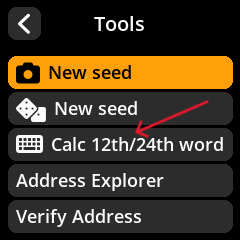
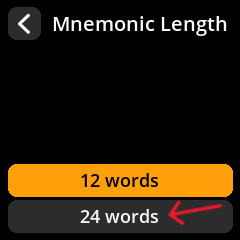
    For this start up the seedsigner and go to "Tools", then choose "Calc 12th/24th word", then choose "24 words" (or 12, if you made a shorter Seedphrase) and type in the 23 words you have.

    image of seedsigner main menu view image of seedsigner tools menu view image of seedsigner tools menu view

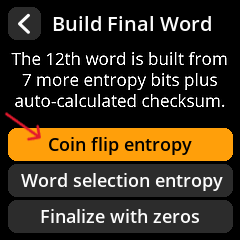
    Once you have input your 23 words, the Seedsigner will ask you how you want to create the last word. You will choose "Coin flip entropy" and input the last 3 digits from your entropy (1s and 0s of row 24).

    image of seedsigner main menu view image of seedsigner main menu view

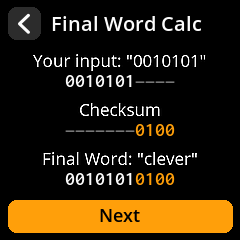
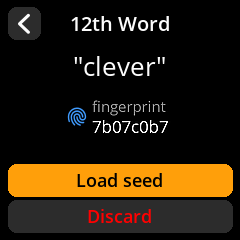
    In the next screen the Seedsigner will show your input again, so you can confirm you didn't make a mistake. Now you will see your checksum as well as your final word. In the image there are seven digits, for us it will be three.

    image of seedsigner main menu view

    In the next screen you will see your 24th word as well as a fingerprint. Write them both down on your paper. Double check, so it is definitely correct.

    image of seedsigner main menu view

    In the next screen, the fingerprint is shown again. You should confirm that you wrote it down without any errors.

    Now you can either click "Done" to finish the process or add a BIP-39 Passphrase which will add more complexity and security to your setup. You can treat it as the 25. word. Keep in mind that it also poses another threat for human error on your part.

    Adding a passphrase in your Seedsigner after having input the 24 words of the mnemonic phrase will results in the creation of a completely new wallet. This means the 24 words are NOT the same wallet as the 24 words + the passphrase. All addresses will be different. Keep this in mind during your setup and when sending BTC.

    Stage 4.2: Backing up the private key as a seedphrase or QR code

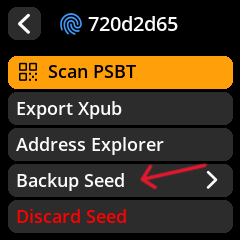
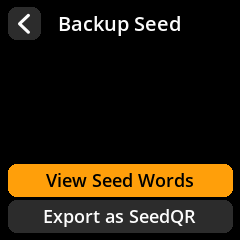
    With your private key loaded in the Seedsigner you can now choose to back up your seed by clicking "Backup Seed" and viewing the Seed Words or Exporting them as a SeedQR (QR Code). This way it can more easily be scanned by Seedsigner later on.

    This is useful but not recommended for your deepest cold storage and more suitable for a wallet which you want to send money away from regularly.

    You can click on "View Seed Words" to confirm once more that you wrote the words down correctly.

    image of seedsigner main menu view image of seedsigner main menu view

    Find the templates at https://github.com/SeedSigner#seedqr-printable-templates, choose the size you prefer. Make sure it matches an option on the Seedsigner and then print it.

    image of seedsigner qr template download page

    To test the QR code, restart the Seedsigner and scan the QR code to see whether the private-key words and the fingerprint match what you wrote down before.

    If they match you successfully created your private-key QR code for quick access via Seedsigner.

    image of sparrow wallet creation screen

    Remember the Seedsigner is a stateless device. This means whenever you want to sign a transaction you will have to input your private key again. This can be cumbersome when using 24 words.

    Choose your backup strategy wisely and balance between accessibility and safety, considering how often you will need to do transaction from this wallet.

    Want a full backup architecture? See Advanced: Seed StoragePremium.
    Stage 5: Create a watch only wallet

    A watch-only wallet can be understood as a gigantic window of armored glass which is break-in proof but lets you see the contents of your vault. We are doing this to be able to keep sending to our vault and checking whether our BTC arrives.

    Considering the amount of effort we went through to create this setup, the funds we are trying to protect must be significant to us. Keep thinking in percentages of your wealth. Decide on a percentage you wouldn't be willing to lose and would want to do your utmost to protect and place them in your new setup. This setup is not for ease of use or for quick day to day transactions but instead for big moves only. Think buying a car, house or any other big aquisition.

    Planning for family access? Advanced: Inheritance SystemPremium.
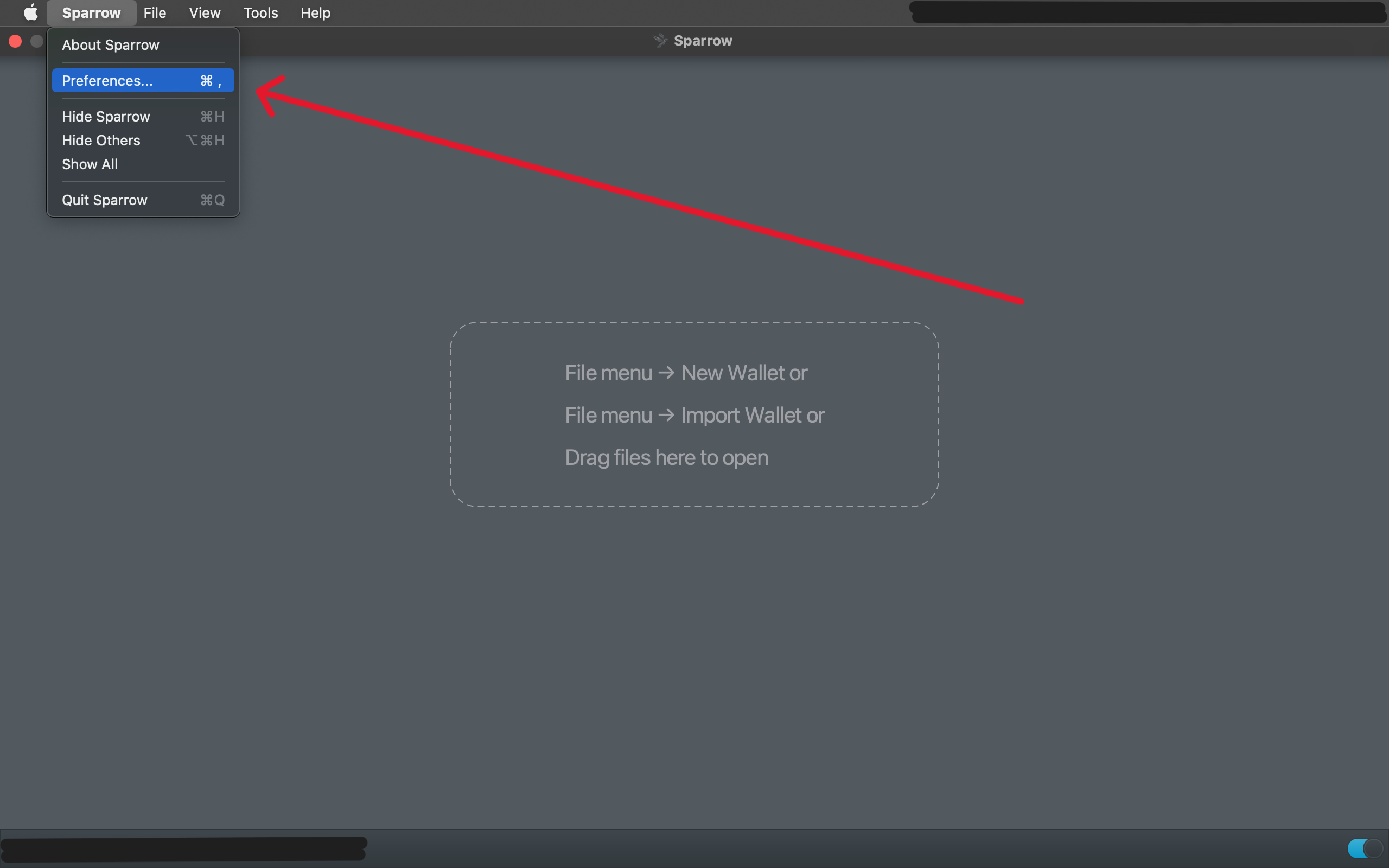
    For more privacy you should build your own Node. If you have done our courses in succession, you have a Node. If you do not own a viable computer, the material cost is between 150€-200€ (year 2025) and highly recommended. If you do not have your own Node you will expose your transaction history to whichever strangers Node you use.

    Stage 5.1: Connect Sparrow Wallet to your Bitcoin Node

    Step 1:

    In Sparrow Wallet, go to "Preferences"

    image of sparrow wallet creation screen

    Step 2:

    Go to the server tab and click "📝 Edit Existing Connection"

    image of sparrow wallet server screen

    Step 3:

    Click on "Private Electrum" and input the IP Address of your Node in the indicated URL field. Next you click on "❔ Test Connection" to see if you can connect to your node.

    image of sparrow server screen

    Step 4:

    The result should be positive and display the welcome message of your Electrum server. Version numbers may vary.

    Connected to electrs/0.9.9 on protocol version 1.4 Batched RPC enabled. Server Banner: Welcome to electrs 0.9.9 (Electrum Rust Server)!
    image of sparrow server screen succesfull connection

    Stage 5.2: Create the watch only wallet

    Click for external video tutorial

    Video Tutorial by Southern Bitcoiner: using Seedsigner in combination with Sparrow Wallet

    Text based guide:

    Take note, that you can either click on "Airgapped Hardware Wallet" and choose the Seedsigner device or choose the "Watch Only Wallet", both will result in your private key not being stored on the computer.

    Step 1:

    Open Sparrow Wallet and go to "File". Click on "New Wallet" and choose a name for the wallet.

    image of sparrow wallet creation screen

    Step 2:

    Write down the Descriptor diligently. Next you click on "👁 xPub / Watch Only Wallet"

    image of sparrow wallet creation screen

    Step 4:

    Turn on the Seedsigner, scan your private-key and go to "export xpub as QR".

    Step 5:

    In Sparrow wallet click on the camera symbol which will activate your computer's camera.

    Step 6:

    With the computer's camera scan the QR code output on the Seedsigner. Make sure this is the xpub QR code option and not your secret private-key!

    This will import a Master fingerprint, derivation path and the xpub.

    Step 7:

    Take note of the derivation path and the master fingerprint.

    Stage 5.3: Testing the wallet

    Stage 5.3.1: Test receive

    Now we will test whether we can receive BTC. This should be a very small amount which you would be ok with losing if something were to go wrong. If you followed the steps carefully and noted down your private key correctly, there should not be any issue.

    After we received some BTC we will be able to test whether we can also send it out again. This will confirm that the BTC we send to the watch only wallet is not stuck and therefore lost.

    Step 1:

    From wherever you hold your current Bitcoin stack, you will send a small amount of money to your new wallet.

    On the left side of the wallet interface click on "🢃 Receive".

    image of sparrow wallet receive window

    Step 2:

    Scan the QR code displayed in Sparrow Wallet or manually type in the address to the device you hold your Bitcoin on currently. Make sure there are no mistakes. It is always good to double check manually even when scanning a QR code or copy pasting.

    image of sparrow wallet receive window

    Step 3:

    Send a small amount of Bitcoin to the address. If there is an option to set the sats/vb(the transaction fee amount) yourself. Make sure it isn't too low to make it into the block and therefore arrive at your address. To check whether your are in the minimum required range of sats/vb go to mempool.space. There you will see "No Priority", "Low Priority", "Medium Priority" and "High Priority". Make sure not to put a sat amount that is in the "No Priority" range.

    Step 4:

    Wait for a notification in Sparrow Wallet that your transaction has been broadcast and received.

    You will then see whether the transaction has also been confirmed. This is important, as an unconfirmed transaction is not usable.

    Sidenote on unconfirmed transactions

    Making unconfirmed transactions usable would reintroduce the double spending problem. As to not undermine the whole endeavor, the ruleset of our network makes this impossible.
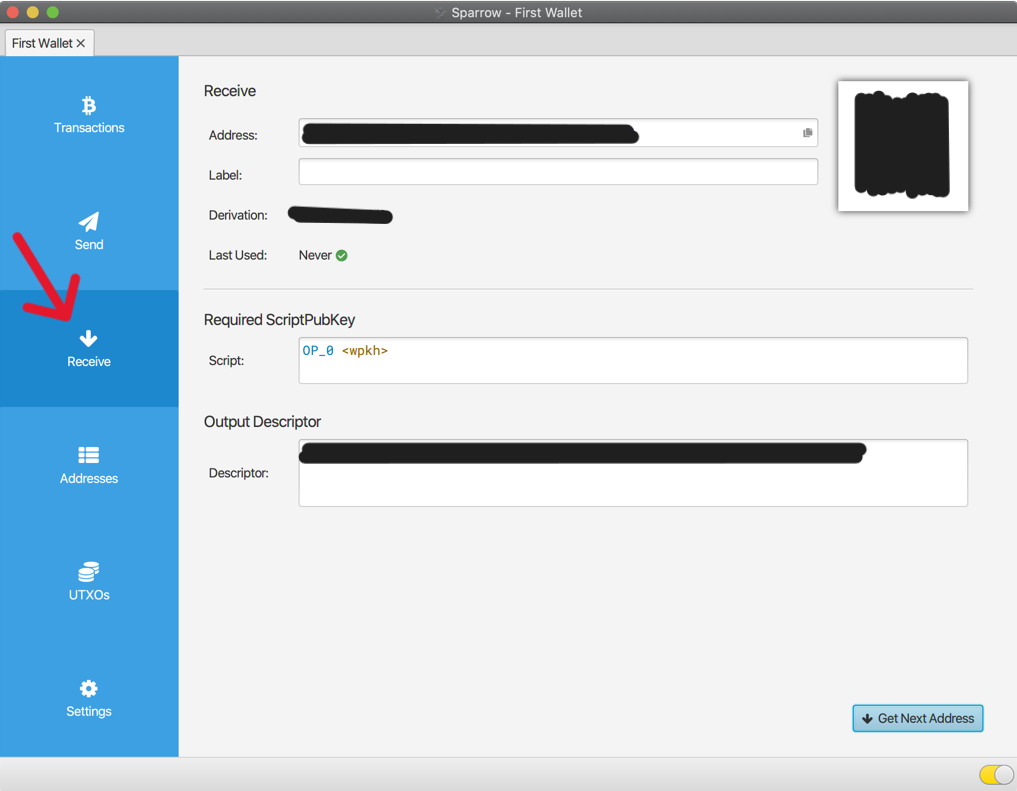
    Once you have received the BTC as indicated by the confirmations, you can move on to testing whether you can also recover and send it.

    Stage 5.3.2: Wallet - Test recovery

    Now that a small amount of BTC is in your wallet, it will be very simple to test whether you can recover the wallet.

    Step 1:

    Close the Sparrow wallet and turn your Seedsigner off.

    Step 2:

    Turn the Seedsigner back on and either scan your Private-Key QR code if you made one or input your Private-Key into the Seedsigner again.

    Step 3:

    In Seedsigner output the xpub (Public-Key) as QR and scan it with Sparrow Wallet

    If your wallet shows up with the same fingerprint, addresses and BTC amount, you have successfully confirmed your ability to recover your wallet.

    Stage 5.3.3: Wallet - Test send

    Step 1: Create a test Transaction

    On the left sidebar click on "Send"

    image of sparrow wallet send screen

    Step 2:

    Enter the recipient's BTC address in the "Pay to" field. Make sure to double check the address for mistakes.

    Step 3:

    Add a label for this transaction for easier tracking

    Step 4:

    Enter a small amount of BTC, since this is to test whether everything works.

    image of sparrow wallet creation screen

    Step 5: Set the Transaction Fee

    Sparrow Wallet allows you to set the transaction fee (sats/vB). Choose an appropriate fee based on the current network conditions. You can check mempool.space for the latest fee recommendations or let Sparrow Wallet set a fee by using the slider.

    mempool.space screenshot
    image of sparrow wallet fee field

    Step 6: Review and Create the Unsigned Transaction

    Once reviewed, click on "Create Transaction". This will create an unsigned transaction.

    Sparrow Wallet will display the unsigned transaction details.

    Step 7: Export the Unsigned Transaction

    Click on "Export PSBT" (Partially Signed Bitcoin Transaction).

    Choose "QR Code" as the export method.

    Sparrow Wallet will display a QR code representing the unsigned transaction.

    Step 8: Sign the Transaction with SeedSigner

    Turn on your SeedSigner device.

    Navigate to the "Scan QR" option on your SeedSigner.

    Use the SeedSigner camera to scan the unsigned transaction QR code from Sparrow Wallet.

    SeedSigner will prompt you to sign the transaction. Confirm the details on the SeedSigner screen.

    SeedSigner will then display a QR code of the signed transaction.

    Step 9: Import the Signed Transaction into Sparrow Wallet

    In Sparrow Wallet, click on "Scan QR" to import the signed transaction.

    Use your computer's camera to scan the QR code displayed on the SeedSigner.

    Step 10: Broadcast the Signed Transaction

    Once the signed transaction is imported into Sparrow Wallet, review the transaction details again to ensure everything is correct.

    Click on "Broadcast Transaction" to send the signed transaction to the Bitcoin network.

    Step 11: Wait for Confirmation

    Sparrow Wallet will notify you once the transaction is broadcast.

    You can track the status of your transaction in the "Transactions" tab of your wallet.

    Wait for the transaction to be confirmed by the network.

    Step 12: Avoiding Dust

    If everything went well, send a larger amount or the full amount, depending on your preference to the same address. This is to avoid creating dust which are amounts of Bitcoin that are so low that the transaction cost to send them would be higher than the amount itself therefore making them unspendable. This is a problem we will be faced with as transaction fees rise. Your aim should be to optimally have no utxo smaller than 0.005 BTC or 500.000 sats. If it is not feasible due to your current financial situation, aim for 0.002 BTC or 200.000sats.

    Stage 6: Final considerations

    Tips for Secure Usage:

    • Double-check all addresses and amounts before signing transactions
    • Never share your private keys
    • Have a comprehensive seed storage strategy

    By following these steps, you can securely send BTC using a watch-only wallet in Sparrow Wallet with a SeedSigner.

    Stuck at a specific step?

    Post your issue in the Solutions Forum and I’ll reply with a concrete fix. Solved answers stay archived for everyone.

    Go to Solutions Forum